
Ask Romel AI

Series 5 posts Morning · Glossary

From one chat box to Claude doing the work.

Most people only use one part of Claude: the chat box. These five posts open the rest, in the order you'll need them.

13parts of Claude, explained
5posts, about 5 minutes each
1line to add to every prompt
Part 1: See the whole map Part 2: Stop starting from zero Part 3: Pick the right model Part 4: Let tools do the legwork Pick a part to jump to it

Why this series

Knowing the parts is how you get more than a chat.

Most people meet Claude as a chat box and stop there. That's like owning a toolbox and only using the hammer. Claude has a lot more in it: places to keep your files, a memory, different models for different jobs, tools that build things you keep, and ways to run work on its own.

I posted the glossary as five parts because that's the order you'll actually use them in. First you see the whole map. Then you set Claude up once so it stops starting from zero. Then you pick the right model, hand the legwork to tools, and finally let Claude run jobs without you. Here the five posts sit together, with every prompt ready to copy.

PART 01 OF 05

See the whole map

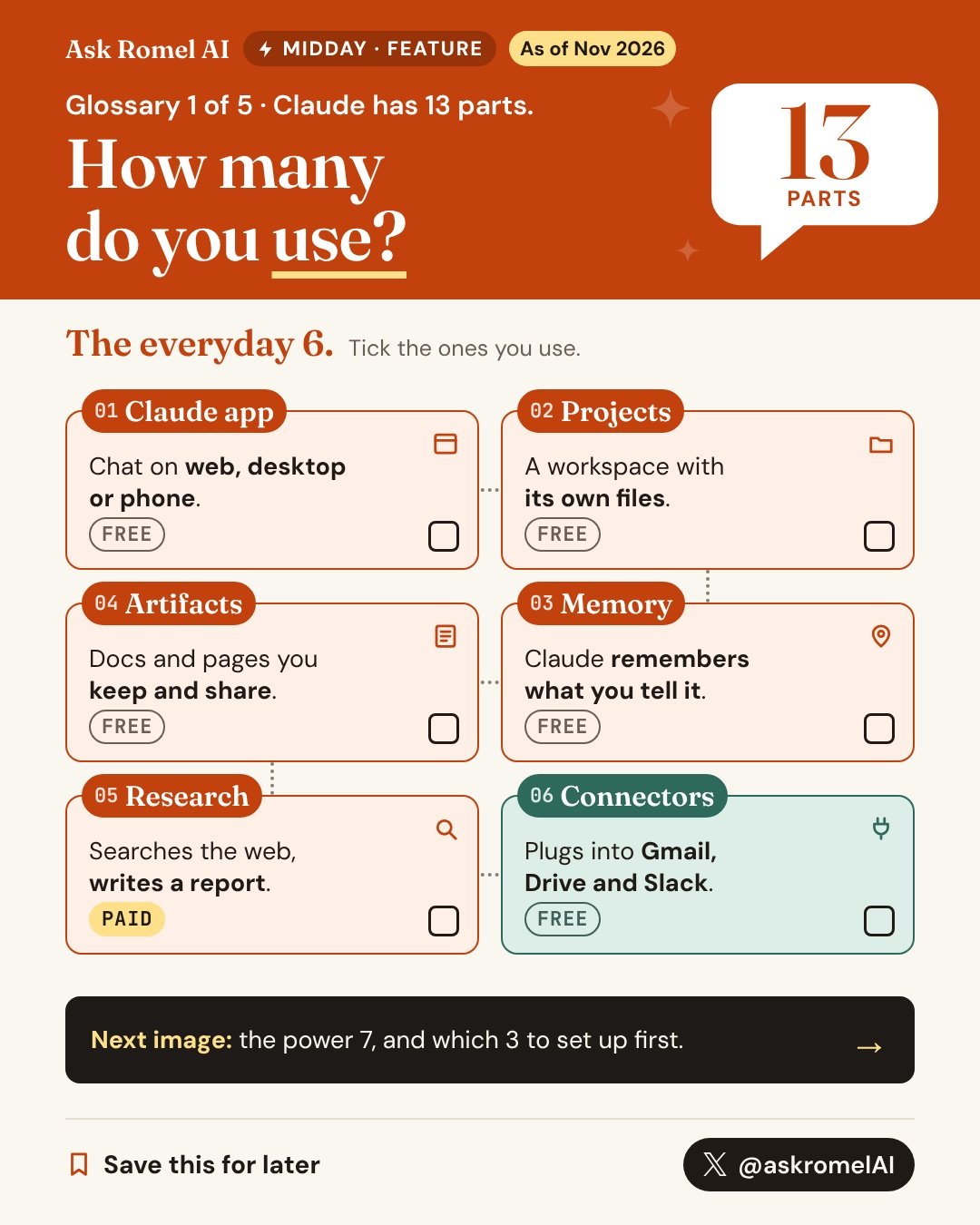
Claude has 13 parts. How many do you use?

Start with the map. The first post lays out every part of Claude on one page, from the app you chat in to Claude Code, and marks which ones are free. Each card has a tick box. Go through it once and tick what you already use. Whatever you didn't tick is what the rest of the series covers.

A few you'll meet in the next posts: Projects (a workspace with its own files), Memory (it remembers what you tell it), Artifacts (docs and pages you keep and share), Research (searches the web and writes a report), Connectors (plugs into Gmail, Drive and Slack), the three models Haiku, Sonnet and Opus, Skills (saved know-how), Scheduled tasks and Claude Code.

NEXT · PART 02Stop starting from zero: set up Projects, Memory and Connectors.
Tap to enlarge

PART 02 OF 05

Stop starting from zero

Set them up once. Use them every day.

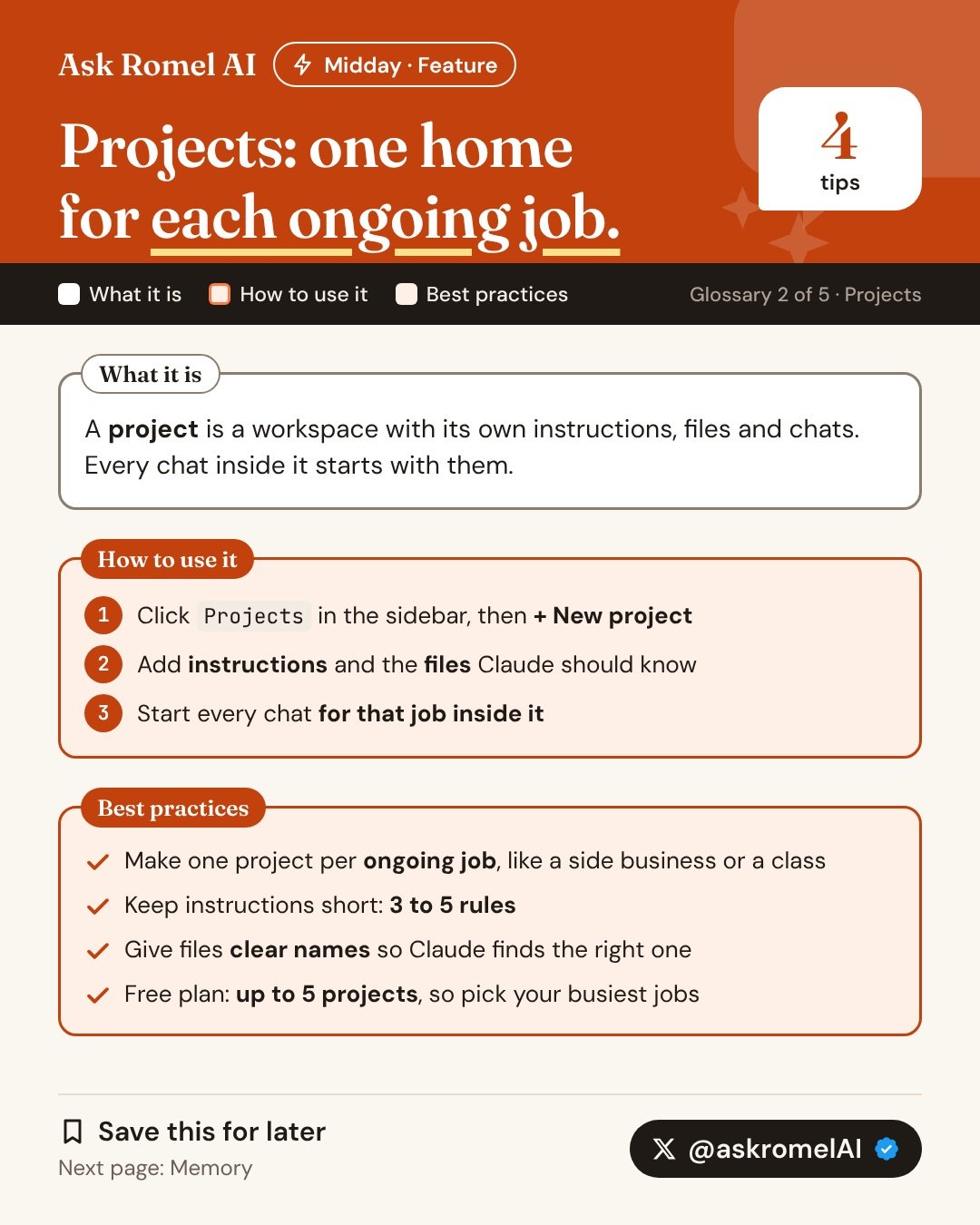
The second post fixes the most common frustration: explaining yourself again in every chat. Three parts carry your background for you. Set each one up once.

Projects · when you repeat the same background

Click Projects in the sidebar, click New Project, then add your rules and files. Every chat inside it starts with them.

Try it in a project
I need a client update in my usual style. Done when it fits one screen.

Memory · when you're tired of re-explaining yourself

Open Settings, turn on memory, and say "remember this."

Try memory
I need you to remember I run a small bakery. Done when you tell me what you saved.

Connectors · the most underrated one

Open Customize, connect Gmail or Drive, sign in and allow access.

Try a connector
I need the lease email from my landlord. Done when you show its date and key terms.
NEXT · PART 03Pick the right model for the size of the job.
Tap to enlarge

PART 03 OF 05

Pick the right model

Better answers from Claude, in 2 clicks.

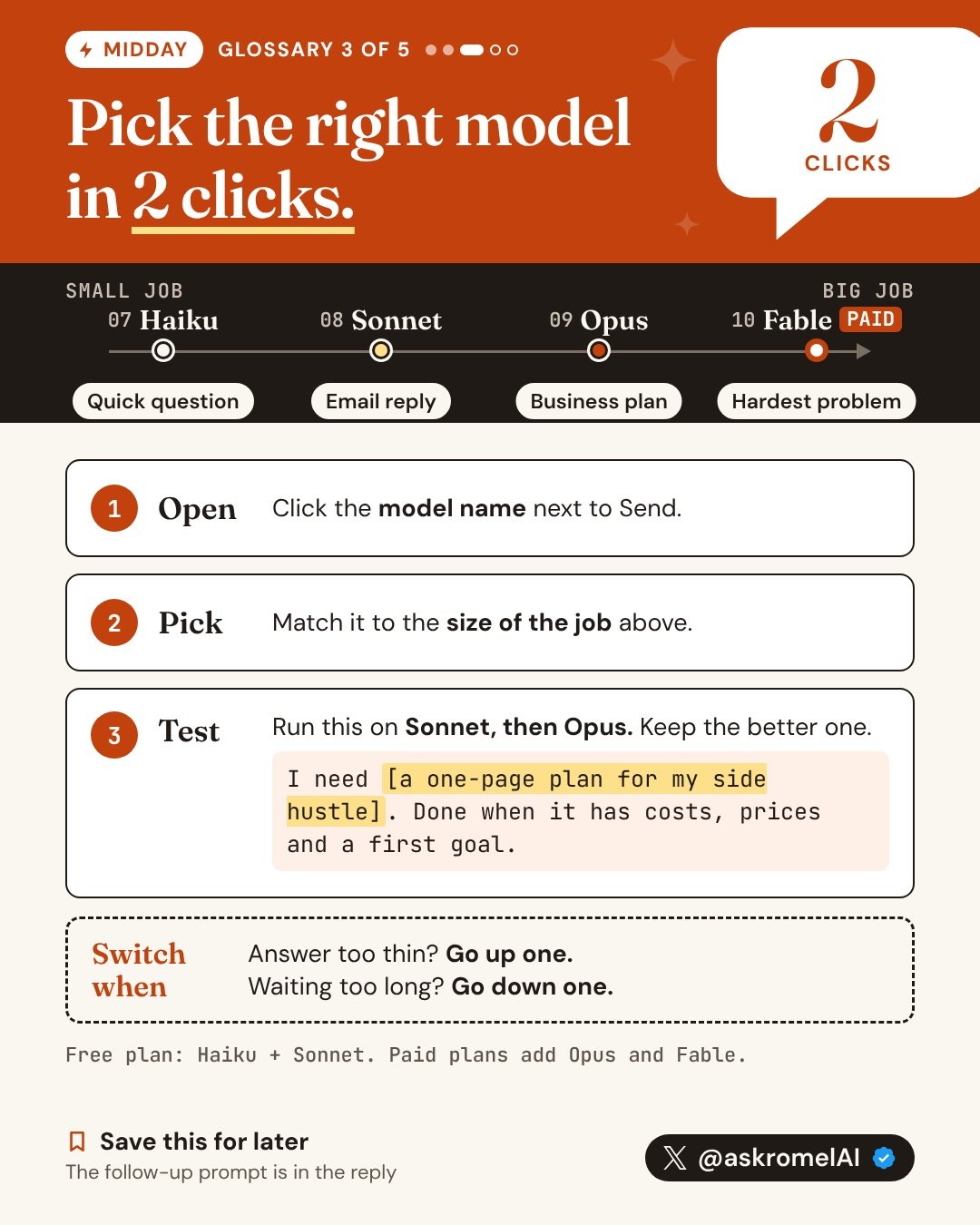
Claude comes in three sizes, and picking the right one is two clicks: click the model name next to Send, then pick the one that fits the job. Small jobs on a small model come back fast. Big jobs on a big model come back better. The free plan includes Haiku and Sonnet.

Haiku · quick, short tasks
I need [this note] to sound friendlier. Done when it fits in 3 lines.
Sonnet · everyday writing
I need a 5-line update from [my meeting notes]. Done when each line starts with a verb.
Opus · big jobs with many steps (paid plans)
I need a week-by-week plan for [my remodel]. Done when each week has one next step.
NEXT · PART 04Let 2 tools do the legwork: Artifacts and Research.
Tap to enlarge

PART 04 OF 05

Let tools do the legwork

Artifacts build a thing you keep. Research digs up the facts.

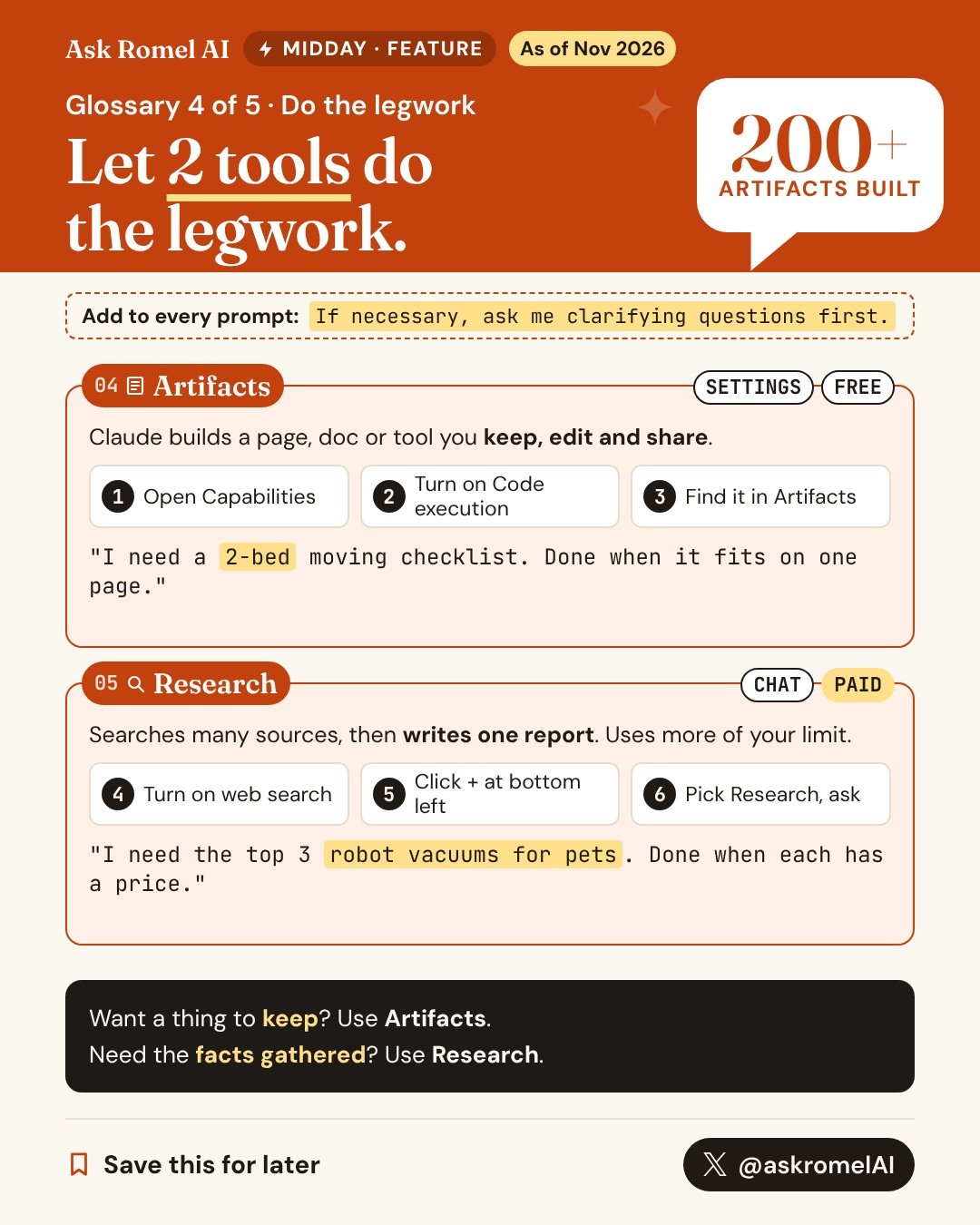
Two tools change what a chat can produce. An Artifact is a page, doc or tool Claude builds that you can keep, edit and share, like the delivery date calculator from the newest guide. Research searches many sources and writes one report.

Artifacts · all plans

Turn it on: open Settings, then Capabilities, and turn on Code execution. Find yours under Artifacts.

Try an artifact
I need a 2-bed moving checklist. Done when it fits on one page.

A long list you'd scroll past in chat becomes a one-page checklist with tick boxes.

Research · paid plans

Make sure web search is on, click + at the bottom left, pick Research, then ask. It uses more of your limit, so save it for questions worth a full report.

Try research
I need a top 3 pet robot vacuums. Done when each has a price.
NEXT · PART 05Let Claude run on its own with the last 3 parts.
Tap to enlarge

PART 05 OF 05

Let Claude run on its own

The last 3 parts. Claude does the rest.

The last post is where the map ends up: Claude doing work without you starting it each time.

Skills · all plans

Saved know-how Claude uses on its own. Turn on Code execution in Settings, open Customize, then Skills, and switch a skill on.

Try a skill
I need a 5-slide Q3 deck. Done when each slide has 3 bullets.

Scheduled tasks · paid plans

Claude does a job on a timer. Click Scheduled, click New task, paste the prompt and pick how often.

Try a scheduled task
I need a Monday email recap. Done when it lists what needs a reply.

Claude Code · paid plans

Claude works in your files. Install Claude Code, sign in, open a folder and paste the prompt.

Try Claude Code
I need my photos renamed by date. Done when each name starts with it.
Tap to enlarge

You finished the series. Get the next one in your inbox.

Join free for one useful AI tip a week, the Claude Glossary Playbook, and every tool on the site.

More series like this one land on X first.

Follow me on X for more

Free ebook: The Claude Glossary Playbook

Get it